How Many YouTube Shorts Should You Upload on Day 1?

YouTube Shorts have transformed the way creators engage
audiences, receiving over 9 trillion views as of November 2025, averaging 100
million views per day. Even creators with zero subscribers can achieve massive
reach when posting at the right time. Indzu Social brings you this guide to
learn how
to create, upload, and optimize Shorts for maximum growth.
History of YouTube Shorts
YouTube Shorts launched in 2019 to rival TikTok. Initially a
beta for select creators, it expanded in India in September 2020 after TikTok
was banned and went global on July 13, 2021. YouTube later introduced YouTube
Create in 2023, allowing editing and expanding Shorts to three minutes. All
videos under 180 seconds automatically become Shorts.
How to Make YouTube Shorts
- Open
YouTube and tap the Create button.
- Choose
Shorts and click Add.
- Select
a video from your gallery and click Next.
- Add
a title, hashtags, location, and choose Public visibility.
- Click
Upload Short, then add text, music, or overlays.
How Many Shorts to Upload on Day 1
For new creators, posting 3–5 Shorts on Day 1 is
ideal. Uploading
multiple Shorts:
- Gives
the YouTube algorithm more data points (niche, audience, engagement).
- Increases
chances of going viral.
- Helps
you learn which hooks and content types work best.
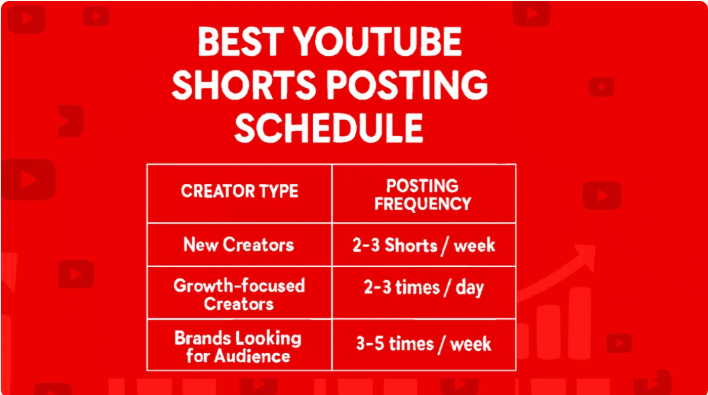
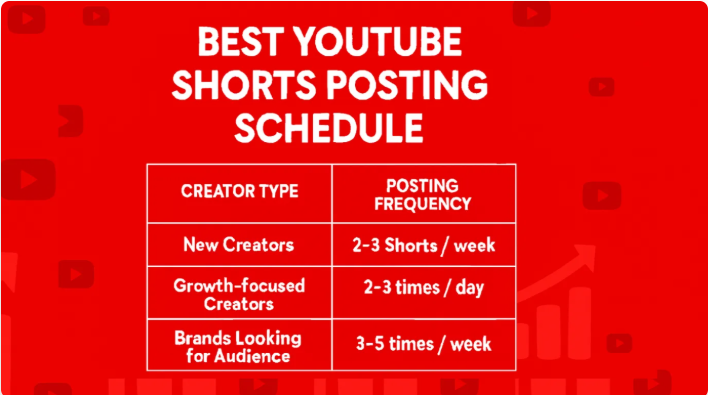
After Day 1:
- New
creators: 2–3 Shorts/week.
- Growth-focused
creators: 2–3 Shorts/day.
- Brands:
3–5 Shorts/week.
Consistency matters more than quantity, and scheduling with
Indzu Social helps maintain a steady upload routine.
YouTube Shorts Specs
- Aspect
Ratio: 9:16 vertical.
- Resolution:
1080 x 1920 pixels (minimum 720 x 1280).
- Length:
Up to 180 seconds, ideally 15–30 seconds.
- Format:
MP4 (H.264).
- Thumbnail:
1280 x 720 pixels (16:9 ratio).
Best Practices for High-Performing Shorts
- Hook
viewers immediately: Capture attention in the first 3 seconds.
- Keep
it snappy: Shorter videos (15–30 seconds) maximize retention.
- Add
captions and text overlays: 80% of viewers watch without sound.
- Use
a clear CTA: Encourage subscriptions, likes, or engagement.
- Experiment
and iterate: Test different hooks, trends, and formats monthly.
Common Reasons Shorts Don’t Get Views
- Weak
hook or title.
- Incorrect
video length.
- Low-quality
thumbnail.
- Irregular
posting schedule.
- Misaligned
content and audience.
YouTube Shorts is a powerful tool for creators, brands, and
businesses. By following these tips and using
Indzu Social, you can create high-quality Shorts, plan content,
schedule posts, and grow your audience faster than ever.
Indzu Social makes content creation seamless, helping you
produce, schedule, and optimize Shorts to reach the right audience and achieve
maximum engagement.
For more visit us: https://indzu.com/blog/social/how-many-youtube-shorts-should-i-upload-on-day-1/


Comments
Post a Comment